is there a way to save the cert and map as a .pdf file? When I use the Save as PDV function in the Print menu, I get a cut off version
How to save the cert and map as .pdf
I just downloaded this course in PDF and did not experience the same issue.
Jim: Thanks. I can print your attachment fine. Both Chrome and Firefox save a cutoff version when printed to pdf or any of the other formats available from the Print screen. I can correctly print from Safari. Of note, Chrome and Firefox both show Course Certificate Viewer when printed to pdf Safari does not.
Additionally, the map for CT19035JHP in the Course Viewer has the top border cut off. The pdf that was uploaded is attached for info.
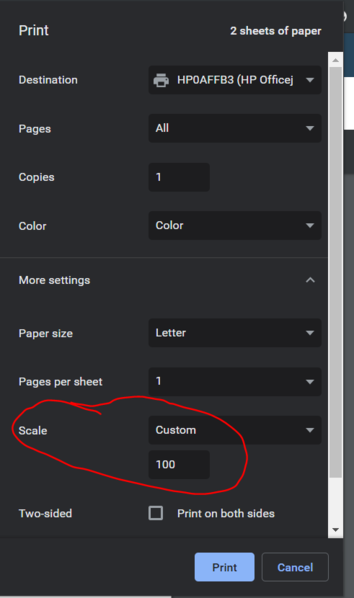
Suggest the Scale setting your browser's print settings to Custom 100 in Print | More Settings (Below is snip from Chrome browser)
Attachments: